🇸🇦 العربية

Static, Visibility & Arrays of Objects

Object-Oriented Programming — Part 3
CPCS 203  |  Programming II  |  Module 04
📋 What We Will Cover in This Tutorial
  1. Passing Objects to Methods
  2. Instance vs Static — The Story
  3. Motivation Behind Static (Why Do We Need It?)
  4. Packages & Visibility Modifiers
  5. Encapsulation: Private Fields, Getters & Setters
  6. Arrays of Objects
1
Passing Objects to Methods

Let us start by completing our journey into Object-Oriented Programming. In the previous tutorials we learned how to define a class, create objects, and write constructors. Now, what if we want to pass an object as an argument to a method? It is surprisingly simple — and very powerful.

Think of it this way: just as you can pass an int or a double into a method, you can pass an entire object. The method then works with that object using a reference.

Circle.java
public class Circle { private double radius; private String color; public Circle(double radius, String color) { this.radius = radius; this.color = color; } public double getArea() { return Math.PI * radius * radius; } public String toString() { return "Circle[radius=" + radius + ", color=" + color + "]"; } }
Main.java — Passing a Circle to a method
public class Main { // This method RECEIVES a Circle object as a parameter public static void printCircleInfo(Circle c) { System.out.println("Circle info : " + c); System.out.println("Area : " + c.getArea()); } public static void main(String[] args) { Circle myCircle = new Circle(5.0, "red"); // Pass the object — just like passing any other variable printCircleInfo(myCircle); } }
💡 Key Concept — Pass by Reference Value
In Java, when you pass an object to a method, you are passing the reference (the memory address of the object). Both the caller and the method look at the same object in memory. Changes made to the object's fields inside the method will be visible outside.
📌 Why is this useful?
  • You can write utility methods that work on any object of a given class.
  • You can compare two objects inside a method (e.g., compareAreas(Circle c1, Circle c2)).
  • Methods can modify the state of the passed object — giving you tremendous flexibility.
2
Instance vs Static — The Full Story

2.1 — What Does "Instance" Mean?

Let us start with something you already know. You have written code like this before:

Circle c1 = new Circle(5.0, "red");

You probably said: "I have created an object of Circle." That is correct. But here is the important part — you can also say it differently:

"I have created an instance of Circle."

Both sentences mean exactly the same thing. The word instance just emphasizes that this particular object was born from the Circle class. And we can create multiple instances from the same class — each one is independent, each one has its own data.

📖 Definition — Instance
An instance is a specific, concrete object created from a class. Every time you use the new keyword, you create a new instance. Each instance lives in its own region of memory (the Heap).

2.2 — Instance Variables & Instance Methods

Look at our Circle class. It has radius and color. Now imagine we create two circles:

Circle c1 = new Circle(5.0, "red"); Circle c2 = new Circle(10.0, "blue");
Memory Visualization — Two Independent Instances
Stack  →  Heap
c1
Circle Object #1
radius5.0
color"red"
c2
Circle Object #2
radius10.0
color"blue"
📌 Instance Variable
radius and color are instance variables because each instance (c1, c2) has its own private copy of these values. Changing c1's radius does not affect c2's radius.
📌 Instance Method
A method like getArea() is an instance method because it belongs to a specific instance — it works on that instance's data (this.radius). You must call it on an object: c1.getArea().

2.3 — Static Variables: Shared by All Instances

Now here is the big question: what if we want a variable that is not owned by any single instance, but instead is shared by all instances? For example, suppose we want to count how many Circle objects have been created so far. Where do we put such a counter?

If we make counter a regular (instance) variable, each circle would have its own counter — and they would always be 1. That is useless. We need a variable that all circles look at together.

That is exactly what the keyword static does.

Circle.java — Adding a static counter
public class Circle { // Instance variables — each object has its OWN copy private double radius; private String color; // Static variable — SHARED by ALL instances of Circle private static int counter = 0; public Circle(double radius, String color) { this.radius = radius; this.color = color; counter++; // Every new Circle increments the shared counter } public static int getCounter() { return counter; } }
Main.java — Creating three Circle objects
// We now create three objects of type Circle Circle c1 = new Circle(5, "Red"); // Object 1 — radius: 5, color: Red Circle c2 = new Circle(10, "Blue"); // Object 2 — radius: 10, color: Blue Circle c3 = new Circle(7, "Green"); // Object 3 — radius: 7, color: Green // After each constructor runs, the static counter increments. // By the time c3 is created, counter == 3 — shared by all three objects. System.out.println(Circle.getCounter()); // 3

We have now created three objects of type Circle. Each object has its own radius and color — those are instance variables, private to each object. But the counter is a static variable: it does not belong to any single object. Every time a new Circle is created, all three objects see the same counter value.

The following visualization shows exactly how this looks in memory — how c1, c2, and c3 each hold a reference to the same static counter.
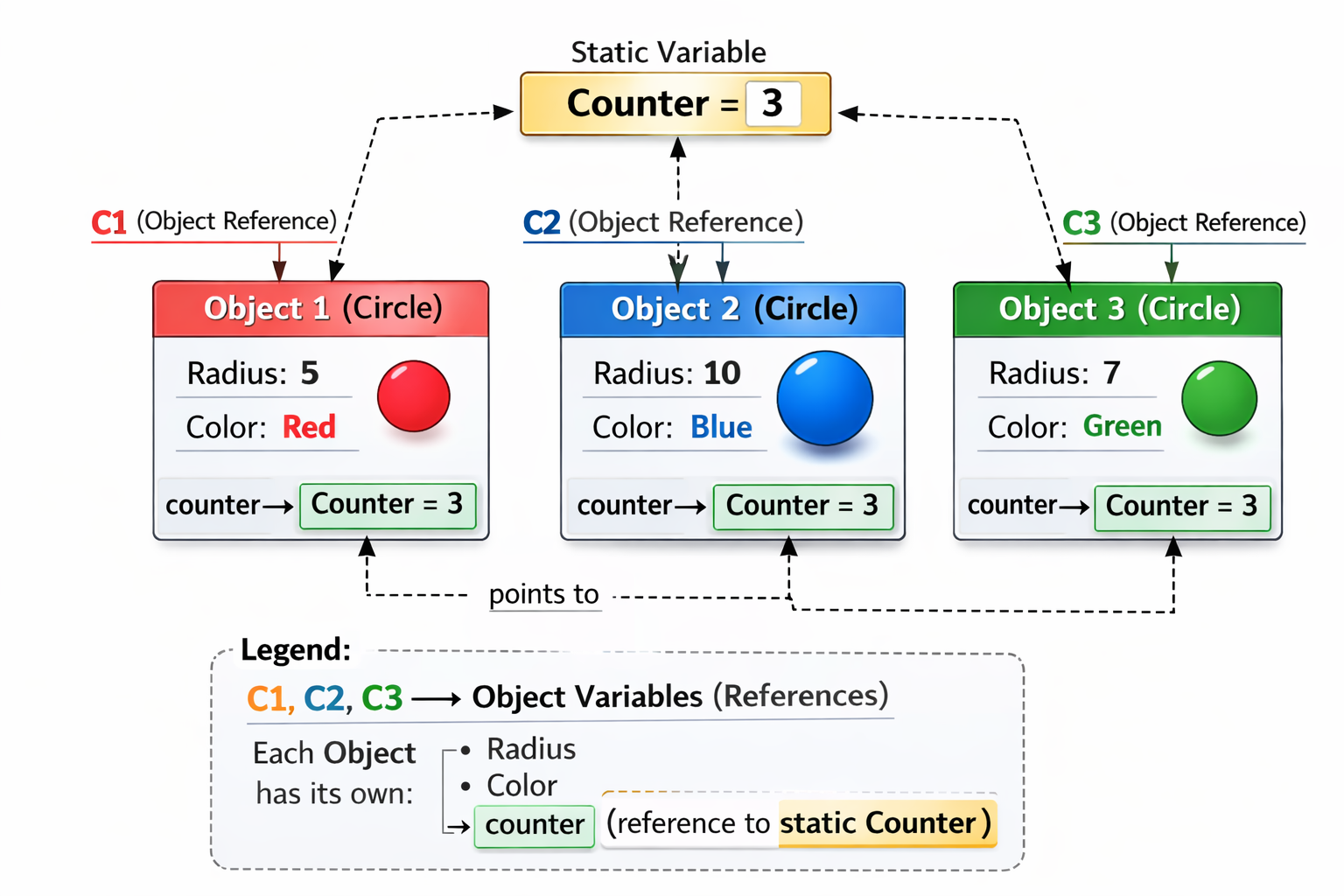
Memory Visualization — Static vs Instance
Static vs Instance visualization — C1, C2, C3 each hold a counter field that points to one shared static Counter = 3
How the counter changes as we create objects:
Before any object
0
No instances created yet
After new Circle(...)
1
First instance created
After 2nd new Circle(...)
2
Counter is shared — still one copy
After 3rd new Circle(...)
3
All instances see the same 3
⭐ The Golden Rule — Static vs Instance
  • Instance variable/method — belongs to a specific object. Each object has its own copy. Access via: objectName.field
  • Static variable/method — belongs to the class itself. Shared by all objects. Access via: ClassName.field (e.g., Circle.getCounter())
UML Class Diagram — Underline means static:
Circle
– radius : double         (instance)
– color : String          (instance)
counter : int          (static)
+ getArea() : double  (instance)
+ getCounter() : int  (static)
3
Motivation Behind Static — Why Do We Need It?

A student might raise their hand and ask: "Professor, I understand what static is — but why do we need it? Can we not do everything with regular instance variables?"

Excellent question. Let us look at two real, compelling scenarios that make static absolutely necessary.

Scenario 1 — Unique Random Student IDs (Why We Need a Static Variable)

🎓 The Problem
Imagine we have a Student class with fields: studentID, name, and age.

The requirement is: every student must automatically receive a random unique ID chosen from the range 1 to 2000. The IDs are not sequential — they are random. Ali might get 5, Hana might get 100, Omar might get 800. But no two students can ever share the same ID.

Now think carefully — how do we guarantee uniqueness? Each instance is completely independent. When Ali's object is being created, it has no way of knowing which IDs Hana's or Omar's objects have already taken. This is the real challenge.

Step 1 — A Student's First Idea (and Why It Fails)

A student raises their hand and says: "Professor, that is okay — the Student class can generate the random ID by itself inside the constructor. But I will maintain a tracking array in main. After I create a Student, I check its ID — if it is already taken, I discard that object and create a new one. I keep doing this until I get a unique ID."

The professor smiles. "Good thinking — but let us look at what that actually looks like in code."

Student.java — class generates a random ID (no uniqueness guarantee)
public class Student { private String name; private int age; private int studentID; public Student(String name, int age) { this.name = name; this.age = age; // Generates a random ID — but cannot guarantee it is unique this.studentID = new Random().nextInt(2000) + 1; } public int getStudentID() { return studentID; } public String toString() { return "Student[ID=" + studentID + "] " + name; } }
Main.java — caller checks for clashes, destroys and recreates objects (BAD design)
public static void main(String[] args) { // Caller must maintain this array to track which IDs have been used boolean[] usedIDs = new boolean[2001]; // Create Ali — keep destroying and recreating until ID is unique Student s1; do { s1 = new Student("Ali", 20); // create object } while (usedIDs[s1.getStudentID()]); // if ID is taken → discard, try again usedIDs[s1.getStudentID()] = true; // mark the ID as used // Same ceremony for every new student... Student s2; do { s2 = new Student("Hana", 21); } while (usedIDs[s2.getStudentID()]); usedIDs[s2.getStudentID()] = true; Student s3; do { s3 = new Student("Omar", 19); } while (usedIDs[s3.getStudentID()]); usedIDs[s3.getStudentID()] = true; }
❌ Why This Approach is Wrong — It Violates Abstraction
Imagine a developer who wants to use your Student class. He will scream. Every time he creates a student, he is forced to maintain a list, write a loop, and manage the ID checking himself. That is not his job — that is the class's job. The abstraction is broken.

The professor says: "You found the right idea — a tracking array. But it belongs inside the class, not in main. Make it static, and the class manages everything by itself."

Step 2 — The Real Solution: a Static Array Inside the Class

Here is the insight: we need a single pool of used IDs that every Student instance can consult and update. That pool must be shared — not duplicated per object.

We declare a static boolean[] array inside the Student class. Because it is static, there is exactly one copy no matter how many Student objects exist. Every instance looks at the same array.

The algorithm inside the constructor is:

📋 ID Generation Algorithm (runs inside the constructor)
1
Generate a random number between 1 and 2000.
2
Look up that number in the static usedIDs array. Is usedIDs[randomNumber] already true?
3
If yes (already used) — go back to step 1 and generate another random number.
4
If no (available) — mark usedIDs[randomNumber] = true and assign this number as the student's ID.
Visualization — The Static usedIDs Array After 3 Students Are Created:
Static Area — one shared copy, visible to ALL Student instances
usedIDs[ ]
[1]
false
[2]
false
[3]
false
[4]
false
[5] ← Ali
true
···
[100] ← Hana
true
···
[800] ← Omar
true
···
[2000]
false
■ true = this ID has been taken by an instance  |  ■ false = this ID is still available
Student.java — Self-contained random unique IDs using a static array
import java.util.Random; public class Student { // ── Instance fields — each object owns its own copy ────────── private String name; private int age; private int studentID; // ── Static fields — ONE shared copy for the entire class ────── private static boolean[] usedIDs = new boolean[2001]; // index 1..2000 private static Random rand = new Random(); // ── Constructor ─────────────────────────────────────────────── public Student(String name, int age) { this.name = name; this.age = age; this.studentID = generateUniqueID(); // handled internally } // ── Private static helper — generates a random unique ID ────── private static int generateUniqueID() { int id; do { id = rand.nextInt(2000) + 1; // random number: 1 – 2000 } while (usedIDs[id]); // if already taken, try again usedIDs[id] = true; // mark it as taken return id; } public String toString() { return "Student[ID=" + studentID + "] " + name + ", age=" + age; } } // ── In main — the caller does NOTHING special ───────────────── Student s1 = new Student("Ali", 20); // might get ID = 5 Student s2 = new Student("Hana", 21); // might get ID = 100 Student s3 = new Student("Omar", 19); // might get ID = 800 System.out.println(s1); // Student[ID=5] Ali, age=20 System.out.println(s2); // Student[ID=100] Hana, age=21 System.out.println(s3); // Student[ID=800] Omar, age=19 // IDs are guaranteed unique — the class handles everything itself
💡 Why This Works — The Static Array is the Secret
  • usedIDs is static — there is exactly one array, shared by every Student instance ever created.
  • When s1 marks usedIDs[5] = true, that change is immediately visible to s2 and s3. They will never pick 5 again.
  • The caller just writes new Student("Ali", 20). The ID complexity is completely hidden inside the class. This is encapsulation and abstraction working together.
  • generateUniqueID() is also static because it only touches static fields — it does not need any instance data.

Scenario 2 — Utility Operations (Why We Need a Static Method)

Now let us think about static methods. When should a method be static?

A method should be static when it does not need to access any instance variable. It performs a general-purpose operation that does not depend on the state of any specific object.

🧮 The Scenario — Math Utilities
Think about Math.sqrt(), Math.pow(), and Math.abs(). You have been calling these all semester. Notice that you never wrote new Math() first. Why? Because they are static methods — they live on the class itself, not on any object.

Another real example: suppose we write a Circle class and we want a method that, given two radius values, tells us which one would produce the bigger area. This method needs no particular instance — it just does a calculation. Making it static is the natural and correct choice.
Circle.java — Static utility method
public class Circle { private double radius; public Circle(double radius) { this.radius = radius; } // Instance method — needs 'this.radius' public double getArea() { return Math.PI * radius * radius; } // Static utility — does NOT need any instance data public static double largerArea(double r1, double r2) { double area1 = Math.PI * r1 * r1; double area2 = Math.PI * r2 * r2; return Math.max(area1, area2); } } // ── In main ──────────────────────────────────────────── // Call static method on the CLASS — no object needed double bigger = Circle.largerArea(4.0, 7.0); System.out.println("Larger area: " + bigger);
⭐ When to Use Static Methods?
  • The method does not use any instance variable (no this.something).
  • The method performs a general utility operation (math, conversion, factory logic).
  • You want callers to use it without creating an object first.
⚠️ Important Restriction
A static method cannot access instance variables or call instance methods directly. Why? Because when you call a static method, there may be no object at all — so this does not exist inside a static context.
4
Packages & Visibility Modifiers

4.1 — The Big Picture: Project → Package → Class

A Java program is organized in layers. Think of it like a building:

🏗️
MyProject
The overall application
📦
com.university.shapes
A package — groups related classes
📄
Circle.java
A class inside the package
📄
Rectangle.java
Another class in the same package
📦
com.university.students
A different package
📄
Student.java
Completely separate concern
📦 Why Do We Need Packages?
Packages are purely for organization. As your project grows to dozens or hundreds of classes, putting everything in one folder becomes chaotic. Packages let you group related classes together — just like folders on your computer. They also allow two different packages to have classes with the same name without conflict.

4.2 — Visibility Modifiers

Now, here is the critical question: if my project has many classes across many packages, who is allowed to see and use which fields and methods? This is controlled by visibility (access) modifiers.

There are four modifiers in Java:

🌍
public — Visible Everywhere
Any class, in any package, in any project can access this member. This is the most open level.
public int radius; — anyone can read it.
🔒
private — Visible Only Inside This Class
Only code written inside the same class can access this member. Not even a subclass can see it. This is the most protective level.
private int radius; — only Circle's own methods can read it.
📦
default (no keyword) — Visible Within the Same Package
If you write no modifier at all, Java uses "default" or "package-private". Only classes in the same package can access it. Classes in other packages cannot.
int radius; — no keyword means default.
🛡️
protected — Same Package + Subclasses
Like default, but also extends to subclasses (child classes), even if they are in a different package. We will fully understand this once we study Inheritance — so we will revisit it later.
protected int radius;
Summary Table — Who Can Access?
Modifier Same Class Same Package Subclass (other package) Everywhere
public
protected
default
private
Visualization — Visibility Across a Project
🏗️ Project
📦 Package: com.shapes
Circle
private radius
public getArea()
default helper()
Rectangle
✔ Can call getArea() (public)
✔ Can call helper() (default — same package)
✗ Cannot access radius (private)
📦 Package: com.students
Student
✔ Can call getArea() (public)
✗ Cannot call helper() (default — different package)
✗ Cannot access radius (private)
⏳ About protected — Coming Later
To fully understand protected, you need to understand Inheritance (parent and child classes). We will come back to it in the Inheritance tutorial. For now, just know it exists and it is between default and public in terms of openness.
5
Encapsulation: Private Fields, Getters & Setters

5.1 — Why Should Data Fields Be Private?

We have been writing private in front of data fields. But why? What is wrong with public fields?

🔓 Imagine Public Fields — The Danger
Suppose you declared: public double radius;

Now any code anywhere in the project can write: myCircle.radius = -999;

A negative radius makes no sense. But Java would allow it because there is no protection. Your object is now in an invalid, broken state — and it is impossible to enforce rules from inside the class.
✅ Private Fields + Controlled Access = Encapsulation
When a field is private, the only way to read or change it from outside is through methods you deliberately provide. Inside those methods, you can validate any value before accepting it. This protects the integrity of your object at all times.
📖 Encapsulation
Encapsulation is the OOP principle of bundling data and the methods that operate on it inside one class, and restricting direct access to the data. It makes code easier to maintain, prevents misuse, and allows the internal implementation to change without affecting external code.

5.2 — Accessors (Getters) and Mutators (Setters)

When you make a field private, you provide controlled access through two types of methods that you will hear about constantly in professional Java development:

📖 Accessor — Getter
Purpose: Allow reading (getting) the value of a private field.

Naming convention: get + FieldName

Returns: the field's value — no modification.

Example: getRadius(), getColor(), getName()
✏️ Mutator — Setter
Purpose: Allow changing (setting) the value of a private field — with validation.

Naming convention: set + FieldName

Returns: void. Takes one parameter.

Example: setRadius(double r), setColor(String c)
Circle.java — Complete encapsulated class
public class Circle { // Private fields — no direct external access private double radius; private String color; public Circle(double radius, String color) { setRadius(radius); // reuse setter so validation runs even in constructor this.color = color; } // ── Getter (Accessor) ───────────────────────────────── public double getRadius() { return radius; } public String getColor() { return color; } // ── Setter (Mutator) — with validation ──────────────── public void setRadius(double radius) { if (radius < 0) { System.out.println("Error: radius cannot be negative. Keeping default."); this.radius = 1.0; // safe default } else { this.radius = radius; } } public void setColor(String color) { this.color = color; } public double getArea() { return Math.PI * radius * radius; } } // ── In main ──────────────────────────────────────────── Circle c = new Circle(5.0, "red"); // Reading a field — must use getter System.out.println(c.getRadius()); // ✔ 5.0 // Changing a field — must use setter (validation runs!) c.setRadius(-10); // Error message printed, radius stays 1.0 c.setRadius(8.0); // ✔ Valid — radius becomes 8.0 // Direct access is BLOCKED by the compiler: // c.radius = -999; ✗ Compile error — radius is private
💡 Why This Design is Powerful
  • Data integrity: Invalid values are rejected before they corrupt the object.
  • Easy maintenance: Change the internal storage format any time — external code using getters/setters is not affected.
  • Debugging made easy: Every read/write goes through one place — you can add logging there instantly.
6
Arrays of Objects

So far we have stored single objects in variables like Student s1, Student s2, Student s3. This is fine for two or three objects. But what if we have 100 students? Writing 100 separate variables is impossible.

The answer is an array of objects — and it works very similarly to an array of primitives, with one important difference you must understand deeply.

6.1 — Declaring and Creating an Array of Objects

Creating an array of 5 Student objects
// Step 1: Declare and create the ARRAY (only the container, not the objects) Student[] students = new Student[5]; // At this point, all 5 slots hold null — no objects exist yet! // Step 2: Create actual Student objects and assign them to slots students[0] = new Student("Ali", 20); students[1] = new Student("Hana", 21); students[2] = new Student("Omar", 19); students[3] = new Student("Lina", 22); students[4] = new Student("Reem", 20); // Step 3: Access objects through the array System.out.println(students[0].getName()); // Ali
🔑 Critical Concept — The Array Stores REFERENCES, Not Objects

This is one of the most important points to understand. When you create new Student[5], Java creates an array of 5 reference slots — not 5 Student objects. The objects themselves live separately in the Heap memory.

The array holds addresses (references) that point to where the objects are. The objects can be scattered anywhere in the Heap.

Memory Visualization — Array of Object References
students[ ]
[0]ref
[1]ref
[2]ref
[3]ref
[4]ref
Student — "Ali"
name: "Ali"  |  age: 20  |  ID: 5
Student — "Hana"
name: "Hana"  |  age: 21  |  ID: 100
Student — "Omar"
name: "Omar"  |  age: 19  |  ID: 800
Student — "Lina"
name: "Lina"  |  age: 22  |  ID: 433
Student — "Reem"
name: "Reem"  |  age: 20  |  ID: 1756
💡 The Objects Are NOT Packed in the Array
The array is just a neat row of addresses. Each address is a reference pointing to wherever the corresponding object lives in the Heap. The actual Student objects could be far apart in memory — the array does not move them together. It just holds directions to find them.

6.2 — Iterating Over an Array of Objects

Using a for loop
// Standard for loop for (int i = 0; i < students.length; i++) { System.out.println(students[i].toString()); }
Using an enhanced for-each loop (cleaner)
// For-each — reads as "for each Student s in the students array" for (Student s : students) { System.out.println(s.getName() + " — Age: " + s.getAge()); }
⚠️ Always Watch for null
Remember: when you create new Student[5], all slots are null by default. If you try to call a method on a null slot, you get a NullPointerException. If you do not fill all slots, use a null check:
for (Student s : students) { if (s != null) { System.out.println(s.getName()); } }

6.3 — Complete Working Example

Main.java — Full array of objects example
public class Main { public static void main(String[] args) { // Create array container Student[] students = new Student[5]; // Populate with Student objects students[0] = new Student("Ali", 20); students[1] = new Student("Hana", 21); students[2] = new Student("Omar", 19); students[3] = new Student("Lina", 22); students[4] = new Student("Reem", 20); // Print all students System.out.println("=== All Students ==="); for (Student s : students) { System.out.println(s); } // Find the oldest student Student oldest = students[0]; for (int i = 1; i < students.length; i++) { if (students[i].getAge() > oldest.getAge()) { oldest = students[i]; } } System.out.println("\nOldest student: " + oldest.getName()); } }
📋 Output
=== All Students ===
Student[1] Ali — Age: 20
Student[2] Hana — Age: 21
Student[3] Omar — Age: 19
Student[4] Lina — Age: 22
Student[5] Reem — Age: 20

Oldest student: Lina
Summary — What We Learned
1. Passing Objects to Methods
Objects are passed as references. Changes inside the method affect the original object.
2. Instance vs Static
Instance = belongs to one object. Static = belongs to the class, shared by all objects.
3. Motivation for Static
Use static for shared state (e.g., a usedIDs[] array that guarantees unique random IDs across all instances) and for utility methods that need no instance data.
4. Packages & Visibility
Packages organize classes. Modifiers (public/private/default/protected) control who can access what.
5. Encapsulation
Private fields protect data. Getters allow reading. Setters allow validated writing. This is encapsulation.
6. Arrays of Objects
Arrays store references, not objects. Objects live in the Heap. Always check for null before accessing.