"Today, my students, we will explore one of the most powerful ideas in programming —
Inheritance. It is one of the most important pillars of OOP, and once
you understand it, you will never write code the same way again."
✓ Encapsulation
✓ Abstraction
▶ Inheritance
Polymorphism
1
It Starts with Nature
Long before computers existed, the word inheritance described
something very human — a son or daughter who inherits the eyes, height, or
personality of their parents. This passing of characteristics from one generation
to the next is one of the most natural things in our world.
👨
Father
height · eye colour talent · personality
👩
Mother
smile · kindness strength · wisdom
👦
Son
inherits + his own unique traits
👧
Daughter
inherits + her own unique traits
The children do not start from zero. They are born with many of their parents'
characteristics already in place — their talents, their looks, their tendencies.
They then add their own unique qualities on top of what they inherited.
💡 The Key Idea
Inheritance means: start with what already exists, then extend it.
Never start from zero when you can build on what is already there.
2
Why Inheritance in Object-Oriented Programming?
📚 Remember from Our First Class
In our very first lesson, we agreed on the definition of software:
Software = A Collection of Objects
📦
Properties
What an object has (data / attributes)
+
⚙️
Behaviour
What an object can do (methods / actions)
We modelled our world as a universe of interacting objects. And in our real universe,
children inherit from parents. So the natural question arises:
🤔
In this world of objects — can some objects inherit
from others, just as children inherit from parents?
Yes! And that is exactly what
Inheritance in OOP is.
🌟 Inheritance in OOP
A class (the "child") can inherit all the
features of another class (the "parent") and then
extend or modify them — exactly like a child in real life.
The child class never starts from zero.
3
Why is Inheritance Important? Two Powerful Reasons
Every time we use inheritance in our programs, we are doing it for one of two reasons — or both:
⛌
Reason 1
Avoid Redundancy
When multiple classes share the same fields and methods,
we move the common code into a parent class so it is
defined only once. No more copy-paste.
♻
Reason 2
Reusability
We can reuse an existing class by either
overriding its old behaviour (modify it) or
adding new methods — without touching the original class.
🌟 Today's Focus
We will explore both reasons through real, working Java examples.
You do not need to understand every line of code yet —
just appreciate what inheritance makes possible.
Before we look at any code, let us understand this word in real life.
You do not need to think about programming at all — just think about
the light switch on your staircase.
💡
Switch 1
Bottom of the stairs
You press it → light turns ON
same light
🟢
Switch 2
Top of the stairs
You press it → light turns OFF
OVERRIDES Switch 1
Switch 1 turned the light ON.
Switch 2 overrides that decision — it does not create a new light,
it takes the same light and changes its behaviour.
Switch 2 replaces what Switch 1 did.
📌 Override means:
take something that already exists and replace its behaviour
with something new. The original behaviour is gone — the new one takes over.
In OOP, a child class can override a method it
inherited from its parent class. The child's version
replaces the parent's version — exactly like Switch 2
replacing what Switch 1 set. The parent still exists, but the child's
behaviour takes over.
Now let us see this in action through a real story between three students.
👨💻
Ali — The Developer
"I wrote a Java program that generates a professional ticket report
for GITEX Global 2025 using Java's built-in
PrintWriter class.
The report has 11 price lines — and it works perfectly!"
💾 Ali's file: ReportWriterDemo.java
↓
😞
Omar — The Problem
"The professor wants all prices to show 2 decimal places
instead of the default format.
I have to search for every single
printf() call and fix it manually.
There are 11 of them!
If the requirement changes again next week — I do it all over."
😱 Omar's approach: edit 11 lines by hand — tedious and error-prone
↓
💡
Ahmed — The Smart Solution
"I will create a new class ReportWriter
that extendsPrintWriter and
overrides only the printf() method
to enforce the decimal format automatically.
Then I replace one single line in Ali's code —
and all 11 prices reformat instantly. Zero other changes."
🌟 Ahmed's approach: one override = change one line, fix everything
Result
What the Report Looks Like — Before & After
✘ Before — prices with many decimal places
Base Ticket : SAR 1500.000000
VIP Upgrade : SAR 500.000000
AI Workshop : SAR 200.000000
Transport : SAR 75.000000
Lunch Package : SAR 100.000000
Gala Dinner : SAR 150.000000
Exhibition : SAR 50.000000
----------------------------------------------------------------
Subtotal : SAR 2575.000000
VAT (15%) : SAR 386.250000
Discount (5%) : SAR -128.750000
----------------------------------------------------------------
TOTAL : SAR 2832.500000
✔ After — Ahmed's one-line fix (2 decimal places)
Base Ticket : SAR 1500.00
VIP Upgrade : SAR 500.00
AI Workshop : SAR 200.00
Transport : SAR 75.00
Lunch Package : SAR 100.00
Gala Dinner : SAR 150.00
Exhibition : SAR 50.00
----------------------------------------------------------------
Subtotal : SAR 2575.00
VAT (15%) : SAR 386.25
Discount (5%) : SAR -128.75
----------------------------------------------------------------
TOTAL : SAR 2832.50
Not a single printf() was touched.
Ahmed overrode the method once in a child class, changed one line in Ali's code,
and all 11 prices reformatted automatically.
That is the power of Override.
A feature is something new that does not exist yet in the original class.
It is something you want to add because you need it — and the original class does not have it.
⚙
New Behavior
A new method — something the class could not do before
📌
New Property
A new field — something the class did not know before
The Scenario
We Have a 2-D Array of Exam Scores
Imagine you have a class of students.
Each student sat 4 exams, and you have 3 students.
The scores are stored in a 2-D array — a table of rows and columns:
int[][] scores
95
87
72
88
60
91
55
76
83
79
94
68
3 rows × 4 columns → 3 students, 4 exams each
Now the question is: we need to save this array to a file
so we can share it as a report.
How do we do it?
The Traditional Way
Write the Loop Yourself
Java's PrintWriter can write text to a file — but it
has no method for printing a 2-D array.
So we write the nested loop ourselves:
// Step 1 — declare the arrayint[][] scores = {
{ 95, 87, 72, 88 },
{ 60, 91, 55, 76 },
{ 83, 79, 94, 68 }
};
// Step 2 — open a file for writingPrintWriterpw = newPrintWriter(newFileWriter("scores.txt"));
// Step 3 — write the array row by row using a nested looppw.println("STUDENT EXAM SCORES");
pw.println("+-----+-----+-----+-----+");
for (int[] row : scores) {
for (intv : row)
pw.printf("| %2d ", v);
pw.println("|");
pw.println("+-----+-----+-----+-----+");
}
pw.close();
It works — but imagine you need to write 10 different arrays to files in your program.
You would copy and paste this entire loop 10 times.
And every time the array size changes, you would have to update every copy.
A Good Question
What If PrintWriter Could Do This for Us?
👨🏫
Student
"Professor — this works, but it is a lot of code.
What if PrintWriter already had a method like
print2DArray()?
Then we could just pass the array and it would write it for us!"
👨🏫
Professor
"Excellent thinking! PrintWriter does not have that method —
but we can add it!
We extendPrintWriter and write that method once.
Then every time we need it, it is just one call.
That is the second power of inheritance — adding new features."
The Solution
Extend PrintWriter — Add ONE New Method
We create a new class EnhancedPrintWriter that
extendsPrintWriter.
We add exactly one new method — print2DArray() —
that did not exist before:
public classEnhancedPrintWriterextendsPrintWriter {
publicEnhancedPrintWriter(Writerout) {
super(out, true);
}
// ✦ NEW METHOD — does not exist in PrintWriterpublic voidprint2DArray(int[][] matrix, Stringtitle) {
super.println(title);
for (int[] row : matrix) {
for (intv : row)
super.printf("| %2d ", v);
super.println("|");
}
}
}
That is all. One class. One constructor. One new method.
We inherited everything else — println, printf, close,
flush — all for free from PrintWriter.
Use It
One Call — That's All
Now instead of writing the nested loop every time, we just do this:
EnhancedPrintWriterepw = newEnhancedPrintWriter(
newFileWriter("scores.txt")
);
epw.print2DArray(scores, "STUDENT EXAM SCORES"); // ✦ the new method!epw.close(); // inherited from PrintWriter — still works!
💡 Notice: we can still call epw.close()
and epw.println() and epw.printf()
as normal — because EnhancedPrintWriteris a
PrintWriter. We added one method and lost nothing.
Redundancy means the same code exists in more than one place.
When you build a large application, you will often have many classes that
share common attributes and behaviours.
If you write those shared parts separately in each class,
you are introducing redundancy — and that leads to a very specific and painful problem
in software: maintenance.
The Example
A Drawing Application with Five Shapes
Imagine you are building a drawing application.
You need to model five shapes:
Circle, Rectangle, Triangle,
Square, and Hexagon.
You write each class independently.
Look carefully at what ends up inside each one:
class Circle
⚠ String color
⚠ boolean filled
⚠ getColor()
⚠ setColor()
⚠ isFilled()
⚠ toString()
✓ double radius
✓ area()
✓ perimeter()
class Rectangle
⚠ String color
⚠ boolean filled
⚠ getColor()
⚠ setColor()
⚠ isFilled()
⚠ toString()
✓ double width
✓ double height
✓ area()
✓ perimeter()
class Triangle
⚠ String color
⚠ boolean filled
⚠ getColor()
⚠ setColor()
⚠ isFilled()
⚠ toString()
✓ double a, b, c
✓ area()
✓ perimeter()
class Square
⚠ String color
⚠ boolean filled
⚠ getColor()
⚠ setColor()
⚠ isFilled()
⚠ toString()
✓ double side
✓ area()
✓ perimeter()
class Hexagon
⚠ String color
⚠ boolean filled
⚠ getColor()
⚠ setColor()
⚠ isFilled()
⚠ toString()
✓ double side
✓ area()
✓ perimeter()
⚠ Count the Duplication
The highlighted rows
are identical across all five classes.
That is 6 common members × 5 classes = 30 duplicate definitions.
All of them doing the exact same thing. Typed five times.
The Real Problem
What Happens When Something Needs to Change?
The duplication alone is not the worst part.
The real damage shows itself the moment something needs to change.
Let us walk through three very common scenarios:
📅 Scenario 1 — A New Common Field
Your team decides that every shape must now store a
borderThickness value.
Since this field belongs to all shapes, you must open
five files — Circle.java, Rectangle.java, Triangle.java,
Square.java, Hexagon.java — and add it to each one.
Five additions. Five chances to make a typo.
Five files to test. Five files in the next code review.
🐛 Scenario 2 — A Bug in toString()
A bug is reported: the toString() output is
missing a space between the label and the value.
This method is written five times — once in each class.
You have to find it in each file, fix it, and make sure all five fixes are identical.
A developer who is in a hurry fixes four of them and misses the fifth.
Now toString() behaves differently depending on
which shape you use. This is a bug that is extremely hard to trace.
📈 Scenario 3 — The Application Keeps Growing
The application grows. You now need to add
Pentagon, Octagon, Star, Rhombus...
Every new shape you add means writing those same six common members
again and again.
The problem does not stay the same size — it grows with your program.
The more shapes you add, the worse the redundancy becomes.
⚠ The Key Takeaway
Redundancy is not just an aesthetic problem — "the code looks ugly."
It is a correctness and maintenance problem.
When the same logic exists in multiple places, keeping them all consistent
as the software evolves is practically impossible.
One update becomes five updates.
One bug fix becomes five bug fixes.
One missed change becomes one hidden, hard-to-find bug.
Software engineers have a name for this principle:
DRY — Don't Repeat Yourself.
Every piece of knowledge should exist in exactly one place in the system.
Inheritance is the tool that makes DRY possible in object-oriented programming.
7
The Motivation is Complete — Now, How?
Everything we have seen so far was motivation.
We explored why inheritance matters, what problems it solves,
and what it can do for us. Before we open a code editor, let us take
a moment to close this motivation chapter and look at the full picture.
🌟 Inheritance — The Third Pillar of OOP
After Encapsulation and Abstraction,
Inheritance is the third foundational pillar of
Object-Oriented Programming.
It is not just a syntax feature — it is a design philosophy:
"Do not repeat yourself. Build on what already exists."
⛌
Avoid Redundancy
Common code lives in one parent class. Change it once — all children update automatically. No more copying, no more inconsistencies.
♻
Reusability: Override
Inherit a method and replace its behaviour — without touching the original class. Your version takes over everywhere it is called.
➕
Reusability: Add Features
Extend any class to add brand-new methods that never existed. The original stays untouched; you use it as your foundation.
❓ The Big Question: HOW?
We know why inheritance is powerful.
We know what it can do for us.
Now comes the most important question for a programmer:
how do we actually write this in Java?
How do we create a parent class?
How do we make a child class inherit from it?
The answer starts with a simple, familiar example.
Let us meet two shapes and discover the solution together.
8
Practice Begins — Meet Circle and Rectangle
Let us say we are building a drawing application.
We need two classes: Circle and
Rectangle.
So we write them each on their own:
class Circle
⚠ String color
⚠ boolean filled
⚠ getColor()
⚠ isFilled()
⚠ toString()
✓ double radius
✓ area()
✓ perimeter()
class Rectangle
⚠ String color
⚠ boolean filled
⚠ getColor()
⚠ isFilled()
⚠ toString()
✓ double width
✓ double height
✓ area()
✓ perimeter()
The highlighted rows
are identical in both classes — typed twice, doing the same thing.
👨🏫
Student
"It is only two classes — that seems manageable, right?"
👨🏫
Professor
"Now imagine your application grows. You add Triangle,
then Pentagon, then Hexagon.
Suddenly those same five members exist in six different classes.
The day you need to change the format of
toString(),
you open six files and change it six times.
Miss one — and your shapes print in different formats.
That is the redundancy problem multiplied."
The Observation
What Are Circle and Rectangle, Fundamentally?
Look at Circle and
Rectangle again and ask yourself:
what do they actually represent?
💡 The Key Insight
A Circle is a Shape. ✓
A Rectangle is a Shape. ✓
A Triangle is a Shape. ✓
The five common members — color, filled,
getColor(), isFilled(), toString() —
describe any shape in general, not any one specific shape.
They belong in a class called Shape.
The IS-A Rule
How to Choose the Right Parent Class
Before making one class extend another, always ask:
"Is a [child class] a [parent class]?"
If the answer is naturally yes, then the relationship makes sense.
This is called the IS-A relationship.
△ Shapes
Circle → IS a shape ✓
Rectangle → IS a shape ✓
Triangle → IS a shape ✓
⇩ Parent class: Shape
👥 People
Professor → IS a person ✓
Student → IS a person ✓
Employee → IS a person ✓
⇩ Parent class: Person
🐾 Animals
Dog → IS an animal ✓
Cat → IS an animal ✓
Goat → IS an animal ✓
⇩ Parent class: Animal
💡 The logic is simple:
if Circle, Rectangle, and Triangle all share common features,
and they are all shapes, then those common features belong in a Shape class.
The same reasoning applies to Person, Animal, or any other natural grouping.
9
Building the Hierarchy — Shape, Circle, Rectangle
Now we apply the observation.
The common features move up into the parent class
Shape.
Each child class keeps only what is unique to it.
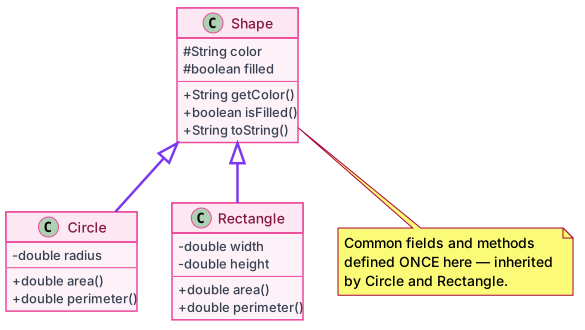
The diagram below — drawn using UML (PlantUML) —
shows the complete picture:
Read the diagram from top to bottom.Shape sits at the top — it holds the common fields and methods.
Circle and Rectangle sit at the bottom —
they each show only what is unique to them.
The arrow with the empty triangle head means
"inherits from". We will study UML notation in detail in the next section.
Java Code
Writing it with the extends Keyword
Now let us translate the diagram into actual Java code.
The keyword extends is how we write
"inherits from" in Java:
// ── The PARENT class — holds everything common ──────public classShape {
Stringcolor;
booleanfilled;
publicStringgetColor() {
returncolor;
}
publicbooleanisFilled() {
returnfilled;
}
publicStringtoString() {
return"color=" + color + ", filled=" + filled;
}
}
// ── CHILD class — inherits from Shape ───────────────public classCircleextendsShape { // ← the "extends" keyworddoubleradius; // Circle's own fieldpublic doublearea() {
returnMath.PI * radius * radius;
}
public doubleperimeter() {
return2 * Math.PI * radius;
}
// getColor(), isFilled(), toString() — inherited from Shape, no need to rewrite!
}
// ── Another CHILD class ──────────────────────────────public classRectangleextendsShape {
doublewidth, height; // Rectangle's own fieldspublic doublearea() {
returnwidth * height;
}
public doubleperimeter() {
return2 * (width + height);
}
// getColor(), isFilled(), toString() — inherited from Shape, no need to rewrite!
}
💡 Notice:
Neither Circle nor
Rectangle defines
color, filled,
getColor(), isFilled(),
or toString().
They do not need to — they inherit all of them from
Shape automatically.
The redundancy problem is solved: those six members are defined
once, in one place, forever.
10
UML — Drawing the Hierarchy
In Object-Oriented Programming, we use
UML — Unified Modeling Language —
to draw class designs as diagrams.
It is a standard notation used in textbooks, interviews, and professional projects.
Let us learn how inheritance looks in UML.
Generated with PlantUML — the standard tool for UML diagrams in Java projects
How to Read It
UML Notation for Inheritance
△ The Arrow
An empty triangle arrowhead pointing from child to parent means
"inherits from" — the same as writing extends in Java.
▭ The Boxes
Each box represents one class. It is divided into three sections:
class name at the top, fields in the middle, methods at the bottom.
🔒 Access Symbols
# = protected - = private + = public.
Child classes show only their own members —
inherited ones are not repeated.
Terminology
Many Names — One Concept
Different textbooks and programming languages use different words
for the same relationship. You will encounter all of them —
they all mean exactly the same thing:
👤 The Class at the TOP
Parent classSuper classBase class
The class that is extended.
It holds the common features shared by all its children.
In our example: Shape.
👦 The Class at the BOTTOM
Child classSub classDerived class
The class that extends another.
It inherits everything from the parent, then adds its own unique features.
In our example: Circle, Rectangle.
11
A Surprising Question — Who Has More Data?
👨🏫
Student
"Professor — in mathematics, the word sub means something
smaller or fewer. A subset has fewer elements than the full set.
So does the subclass have fewer fields than the superclass?"
👨🏫
Professor
"Excellent — and this is exactly where many students get confused!
In mathematics, yes, a subset is smaller.
But in inheritance it is the opposite.
The subclass (child) actually has more data than the superclass (parent).
Let me show you why."
Shape — the superclass
color : String
filled : boolean
2 fields total
<
Circle — the subclass
color : String (from Shape)
filled : boolean (from Shape)
radius : double (Circle's own)
3 fields total
The subclass always has at least as many fields as the superclass
— because it has everything the parent has, plus its own unique additions.
In Java inheritance, the word sub means specialised, not smaller.
The Inheritance Rule
What Exactly Gets Inherited?
When Circle extends
Shape,
do all members of Shape
become usable in Circle?
The answer has two parts — an accessibility condition, and one special exception.
🔑 The Complete Inheritance Rule
All accessible members of the parent class are inherited by the child class —
except constructors.
"Accessible" means public or
protected.
If a member in the parent is declared
private,
the child class cannot use it directly
— even though it exists in the object's memory.
What about default (no modifier)?
A member with no access modifier is package-private —
it is accessible only within the same package.
So it is inherited only if the subclass lives in the same package
as the superclass. If the subclass is in a different package,
the default member is not accessible and therefore not inherited.
The exception — constructors:
Constructors are never inherited, regardless of their access modifier.
Even a public constructor in
Shape does not become
a constructor of Circle.
You cannot call new Circle(...) and
expect Shape's constructor to serve as Circle's constructor.
Each class must define its own constructor.
👨🏫
Student
"But if the private field is physically inside the object in memory,
are we not technically inheriting it anyway?"
👨🏫
Professor
"You are right — it exists in memory. But think of it this way.
Imagine your parent has a bank account. The money is there.
But the account is locked — only your parent can access it.
You know it exists, but you cannot withdraw from it.
Can you truly call it yours?
A private member in Java works the same way.
The child is aware of it, but cannot use it directly.
That is why in inheritance we often use
protected —
which means: accessible to children, but hidden from the outside world.
We will cover this in the next lesson."
Access Modifier
Same Package
Different Package
public
✓ Inherited
✓ Inherited
protected
✓ Inherited
✓ Inherited
default (no modifier)
✓ Inherited
✗ Not inherited
private
✗ Not inherited
✗ Not inherited
constructors (any modifier)
✗ Never inherited
✗ Never inherited
12
Real Example — Private Fields, Constructors, and Inherited Members
Let us now write the complete, proper version of our three classes.
This time, all data fields are private — as they should be in good OOP design.
Each class has its own constructor to initialise its fields.
Shape.java
The Parent Class — Private Fields
public classShape {
privateStringcolor; // ← private — only Shape can access directlyprivatebooleanfilled; // ← private — only Shape can access directlypublicShape(Stringcolor, booleanfilled) {
this.color = color;
this.filled = filled;
}
publicStringgetColor() {
returncolor;
}
publicbooleanisFilled() {
returnfilled;
}
publicStringtoString() {
return"color=" + color + ", filled=" + filled;
}
}
Circle.java
A Child Class — Calls super() to Initialise Shape's Part
public classCircleextendsShape {
privatedoubleradius; // ← Circle's own private fieldpublicCircle(Stringcolor, booleanfilled, doubleradius) {
super(color, filled); // ← passes color & filled UP to Shape's constructorthis.radius = radius;
}
public doublearea() {
returnMath.PI * radius * radius;
}
public doubleperimeter() {
return2 * Math.PI * radius;
}
// getColor(), isFilled(), toString() → inherited from Shape
}
Rectangle.java
Another Child Class
public classRectangleextendsShape {
privatedoublewidth; // ← Rectangle's own private fieldsprivatedoubleheight;
publicRectangle(Stringcolor, booleanfilled, doublewidth, doubleheight) {
super(color, filled); // ← passes color & filled UP to Shape's constructorthis.width = width;
this.height = height;
}
public doublearea() {
returnwidth * height;
}
public doubleperimeter() {
return2 * (width + height);
}
// getColor(), isFilled(), toString() → inherited from Shape
}
ShapesDemo.java
Create Objects in main() and Use Inherited Members
=== Circle ===
color=Red, filled=true
Color : Red
Filled : true
Area : 78.54
Perim : 31.42
=== Rectangle ===
color=Blue, filled=false
Color : Blue
Filled : false
Area : 12.00
Perim : 14.00
getColor(), isFilled(), and toString()
are called on both objects — yet neither Circle nor Rectangle
defines them. They are inherited from Shape and work automatically.
👨🏫
Student
"Professor — you told us that constructors are not inherited.
And we never write new Shape(...) anywhere.
So why did we bother writing a constructor in Shape?
If it is not inherited and we never create a Shape object,
what is the point?"
👨🏫
Professor
"Excellent — this is exactly the right question.
And the answer is connected directly to those
private fields.
Look at color and filled
in Shape — they are private.
Circle cannot touch them. Rectangle cannot touch them.
So when we create new Circle("Red", true, 5.0),
who initialises color and filled?
Only Shape's own constructor can do it.
That is why we need it. Let us see this in detail."
13
Constructor Chain — Why the Superclass Constructor Matters
🔑 Two Rules to Remember Together
Rule 1: Constructors are never inherited —
you cannot call Shape's constructor as if it were a member of Circle.
Rule 2: Nevertheless, when you create a child object,
the parent's constructor is always invoked —
because the parent's private fields can only be initialised by the parent itself.
The Why
Private Fields Can Only Be Set by Their Own Class
Consider what happens when we write
new Circle("Red", true, 5.0).
Java needs to create an object that contains
all four fields: color, filled, radius.
Shape's part of the object
private color = ?
private filled = ?
Only Shape's constructor can set these
+
Circle's part of the object
private radius = ?
Only Circle's constructor can set this
color and filled are private inside Shape.
Circle's constructor cannot write this.color = color
— that line would be a compile error.
The only way to initialise them is to ask Shape's constructor to do it —
and that is exactly what super(color, filled) does.
The Chain
What Happens When You Write new Circle("Red", true, 5.0)
new Circle("Red", true, 5.0) — you write this in main()
this.radius = 5.0 — Circle finishes its own initialisation
💡 The parent always runs first.super(...) must be the very first statement
in the child's constructor — Java enforces this.
Only after the parent's constructor completes does the child continue with its own body.
Implicit vs Explicit
When Can You Skip Writing super()?
You only need to write super(...) explicitly
when the parent has a parameterized constructor.
If the parent has a no-arg constructor (or no constructor at all),
Java calls super() automatically:
// If Shape has a no-arg constructor available:classShape {
Stringcolor = "White";
// No constructor defined → Java provides Shape() { super(); } automatically
}
classCircleextendsShape {
doubleradius;
Circle(doubler) {
// No super() written → Java inserts super() automatically (calls Shape())this.radius = r;
}
}
⚠ When You MUST write super() explicitly
The moment you define any constructor in the parent,
Java removes the automatic no-arg constructor.
If the only constructor in Shape is
Shape(String, boolean),
then any child constructor that does not call
super(String, boolean) will fail to compile.
Challenges
Constructor Chain — Practice
📚 My Student — Memorise This Rule Before You Begin
Rule:
Every constructor of a subclass is responsible for invoking
the constructor of its superclass.
This is inevitable — there are no exceptions.
▶ Explicitly
You write super(...) yourself as the
first statement in the subclass constructor.
▶ Implicitly
You write nothing — Java silently inserts
super() as the first statement for you.
This only works if the superclass has a no-arg constructor.
The following examples will help you understand this rule comprehensively.
Study each one carefully. Ask yourself: which constructor does
the subclass invoke — and does it exist?
Once you can answer that question confidently, this rule will be
solid in your mind forever.
Shape has a no-arg constructor Shape().
Rectangle does not call super() explicitly, so Java
automatically inserts it. Shape() is found and called —
color is set to "White".
✌ Challenge 3
Does this compile?
classShape {
privateStringcolor;
Shape(Stringcolor) {
this.color = color;
}
}
classCircleextendsShape {
privatedoubleradius;
Circle(Stringcolor, doubleradius) {
this.radius = radius; // ← super() is NOT the first statementsuper(color);
}
}
✗ Compile Error
super() must be the very first statement
in the constructor. Placing any other statement before it is a compile error.
Fix: swap the two lines so super() comes first:
Circle(Stringcolor, doubleradius) {
super(color); // ← must be firstthis.radius = radius;
}
super(color, filled) correctly calls Shape(String, boolean),
which sets the private fields. toString() is inherited from Shape
and reads those fields — even though they are private.
The constructor chain is the only way they got initialised.
color and filled are private in Shape.
Circle cannot read or write them directly — not even in its own constructor.
Fix — Option A: use super() to let Shape
initialise its own private fields:
Circle(Stringcolor, booleanfilled, doubleradius) {
super(color, filled); // Shape sets its own private fieldsthis.radius = radius;
}
Fix — Option B: change private to
protected in Shape so the child can access them:
protectedStringcolor;
protectedbooleanfilled;
// Now Circle can write this.color = color directly
Note: Option A is preferred in good OOP design.
Keep fields private and always go through the constructor chain.
✌ Challenge 7
Does this compile?
classShape {
privateStringcolor;
Shape(Stringcolor) {
this.color = color;
}
}
classCircleextendsShape {
privatedoubleradius;
// no constructor written at all
}
✗ Compile Error
When no constructor is written, Java provides a default
Circle() { super(); } automatically.
That implicit super() looks for Shape() —
which was removed when Shape(String) was defined.
Fix — Option A: add a constructor to Circle
that calls super(String):
The chain runs top-down: Animal constructor runs first,
then Dog, then Puppy.
The parent always finishes before the child continues.
This is true even across three levels.
A class can have multiple constructors (constructor overloading).
Both Circle constructors call super(String, boolean) correctly —
one receives the values from the caller, the other uses hardcoded defaults.
Both of these are valid:
newCircle("Red", true, 5.0); // calls first constructornewCircle(3.0); // calls second constructor, color="White"
✌ Challenge 11
Does this compile? Shape has no constructor at all.
classShape {
Stringcolor = "White";
// no constructor defined
}
classCircleextendsShape {
privatedoubleradius;
Circle(doubleradius) {
// no super() written herethis.radius = radius;
}
}
✓ Compiles Correctly
Because Shape defines no constructor, Java automatically
provides a default one behind the scenes:
// Java inserts this invisibly:Shape() { super(); }
Circle's constructor does not write super() explicitly —
so Java inserts it implicitly as the first statement.
That implicit super() finds Shape's auto-provided
no-arg constructor and calls it successfully.
The rule still holds: the superclass constructor is invoked —
just implicitly on both sides.
✌ Challenge 12
Does this compile? Neither class defines a constructor.
classShape {
Stringcolor = "White";
// no constructor defined
}
classCircleextendsShape {
doubleradius = 1.0;
// no constructor defined
}
newCircle();
✓ Compiles Correctly
Java provides a default constructor for every class that
defines none. So both classes get one automatically:
// Java inserts for Shape:Shape() { super(); }
// Java inserts for Circle:Circle() { super(); } // calls Shape() above
The entire constructor chain is handled automatically.
new Circle() triggers Circle's default → which calls
Shape's default → which calls Object's constructor.
This is the most silent form of the rule — yet the rule
is still followed completely.
✌ Challenge 13
Does this compile? Shape has no constructor. Circle calls super() explicitly.
classShape {
Stringcolor = "White";
// no constructor defined
}
classCircleextendsShape {
privatedoubleradius;
Circle(doubleradius) {
super(); // ← explicit call to Shape's auto-provided constructorthis.radius = radius;
}
}
✓ Compiles Correctly
Writing super() explicitly here is valid and
equivalent to leaving it out — both call Shape's
auto-provided no-arg constructor.
This is actually good practice: writing super()
explicitly makes the constructor chain visible to
anyone reading the code, even when Java would have inserted it anyway.
✌ Challenge 14
Does this compile? Shape has no constructor. Circle calls super(color).
classShape {
Stringcolor = "White";
// no constructor defined — only Shape() exists (auto-provided)
}
classCircleextendsShape {
privatedoubleradius;
Circle(Stringcolor, doubleradius) {
super(color); // ← Shape has no Shape(String) constructor!this.radius = radius;
}
}
✗ Compile Error
Shape defines no constructor, so Java only provides
Shape() — a no-arg constructor.
Shape(String) does not exist.
Calling super(color) asks for a constructor that
was never defined and was never auto-provided.
Fix — Option A: define Shape(String)
explicitly so it can be called:
Fix — Option B: remove the argument from super()
and set color directly (since it is not private here):
Circle(Stringcolor, doubleradius) {
super();
this.color = color; // allowed — color is not private in Shapethis.radius = radius;
}
📚 Summary — Constructor Chain Rules
Constructors are never inherited — but the parent's is always invoked.
Private fields in the parent can only be initialised by the parent's constructor — that is why we need it.
super(...) must be the first line in the child's constructor.
If the parent has no no-arg constructor, the child must call super(...) explicitly.
Defining any constructor in a class removes Java's automatic default ClassName().
14
Tracing a 3-Level Chain — super() Meets this()
By now, you already know the rule:
the constructor of a subclass is responsible for invoking the constructor of its superclass.
We have practised this through the previous challenges — and every one of those examples had
exactly two levels: one parent class and one child class.
But what happens when we have a hierarchy of classes?
Imagine class D inherits from C,
C inherits from B,
and B inherits from A —
that is four levels deep. The same rule still applies at every level, and the result
is a constructor chain.
In this challenge we use three levels: Machine,
Vehicle, and Car.
Car is a subclass of Vehicle,
and Vehicle is a subclass of Machine.
That means:
the constructor of Car is responsible for invoking the constructor
of Vehicle —
and the constructor of Vehicle is responsible for invoking the
constructor of Machine.
This is the chain. Now we need to understand how it works and how to trace it.
Here is the strategy: follow the computer.
Do not look at all the code at once. Take it one line at a time, exactly as Java does.
Every time you ask "what happens on this line?" you will always find a clear answer.
After you see it step by step, it becomes very simple — and your students will love it.
The Hierarchy
Three Classes, Two Mechanisms
GRANDPARENT
Machine
←
PARENT
Vehicle
←
CHILD
Car
The Code
Read Every Constructor — Then Follow the Trace
The comments marked // Java inserts →
show the invisible lines Java adds for you.
Nothing else is hidden — everything you see is exactly what runs.
The Computer Strategy
Don't Look at All the Code at Once — Follow It One Line at a Time
The computer does not read the entire file first. It executes one line,
then the next. Adopt that same mindset when tracing:
never jump ahead — just ask "what happens on this exact line?"
and follow the arrow it points to.
1
main()
executes new Car()
An object is being created. Rule: whenever an object is created, its constructor is invoked.
main() — entry point
public static voidmain(String[] args) { newCar();// ← Car() constructor is invoked }
→ Java immediately invokes Car().
2
Inside Car() — first line
Car is a subclass of Vehicle.
Rule: every subclass constructor must invoke its superclass constructor
— explicitly or implicitly. You can see that no super() or this()
is written inside Car(). So Java inserts super() automatically
as the very first line — this is the implicit call:
→ Java now jumps to Vehicle() (the no-arg constructor of the parent).
The println("Car") line is waiting — it will not run until super() returns.
3
Inside Vehicle() — first line
The first line is this("Vehicle 1").
Who goes first — super() or this()?
Answer: this() wins.
It executes immediately and takes responsibility for reaching the superclass.
The second line is waiting — it will only run after this() returns.
Vehicle.java — no-arg constructor
publicVehicle() { this("Vehicle 1");// ← delegates to Vehicle(String) — executes now System.out.println("Vehicle 2");// ← waiting... }
→ Java jumps to Vehicle("Vehicle 1") — a constructor in the same class.
4
Inside Vehicle("Vehicle 1") — first line
This constructor also belongs to Vehicle, which is a subclass of Machine.
No super() or this() is written here, so Java
inserts super() automatically as the first line.
The println is waiting.
Vehicle.java — parameterised constructor — what Java actually executes
→ Java now jumps to Machine() — the deepest ancestor.
5
Inside Machine() — deepest ancestor reached
Machine has no explicit superclass — Java inserts
super() to Object (we will discuss this later).
No more waiting — the body runs now and prints "Machine".
Then Machine() finishes and returns.
Machine.java — deepest ancestor
publicMachine() { System.out.println("Machine");// ← prints now — first output! }
→ Machine() returns to Vehicle("Vehicle 1").
6
Vehicle("Vehicle 1") resumes — super() returned
super() has returned. The line that was waiting now runs:
prints "Vehicle 1".
Then Vehicle("Vehicle 1") finishes and returns to Vehicle().
Vehicle.java — parameterised constructor resumes
publicVehicle(String msg) { super();// ✓ returned System.out.println(msg);// ← now runs — prints "Vehicle 1" }
→ Returns to Vehicle().
7
Vehicle() resumes — this() returned
this("Vehicle 1") has returned. Vehicle() is not done yet —
it still has a second line waiting. Now it runs:
prints "Vehicle 2".
Then Vehicle() finishes and returns to Car().
Vehicle.java — no-arg constructor resumes
publicVehicle() { this("Vehicle 1");// ✓ returned System.out.println("Vehicle 2");// ← now runs — prints "Vehicle 2" }
→ Returns to Car().
8
Car() resumes — super() returned
The implicit super() has returned.
The line that was waiting now runs: prints "Car".
Car() finishes — the object is fully constructed and ready.
Car.java — constructor resumes
publicCar() { super();// ✓ returned System.out.println("Car");// ← now runs — prints "Car" — last! }
✓ Object is fully constructed and ready to use.
Output
What Appears on Screen
TERMINAL OUTPUT
Machine
← Machine() ran first — deepest ancestor (Step 5)
Vehicle 1
← Vehicle(String) resumed after Machine() returned (Step 6)
Vehicle 2
← Vehicle() resumed after this() returned (Step 7)
Car
← Car() resumed last — always the shallowest class (Step 8)
🤔 My Student — Why Does the Output Appear in This Order?
You created a Car object — yet
Machine printed first.
That seems backwards. To understand why, you need to see something about
how Java runs your program: a data structure called the Call Stack.
Think of a stack of books on a table. You can only ever add or remove a book
from the top. The last book you placed is always the first one you pick up.
This is called Last In, First Out (LIFO).
Every time Java calls a method, it pushes that method onto the call stack.
That method cannot continue until whatever it called returns.
When a method finishes, it is popped from the top.
Because Machine() was the last to be pushed,
it is the first to be popped — and the first to print.
Car() was pushed first but finishes last —
so it prints last.
🎬 Animation
Watch the Call Stack Build and Unwind
Press ▶ Start to trace exactly what happens in memory,
step by step. Watch the stack grow — then watch it unwind.
Output appears only when each frame is popped:
Ready — click ▶ Start
↕ PUSH in & POP out
— stack is empty —
▮▮ BOTTOM — main() lives here
→
Terminal Output
— no output yet —
Press ▶ Start to begin the step-by-step trace.
🏫 A Note from Your Professor — Data Structures
My student — do not worry if the call stack is a new idea.
You will study it in full detail in your Data Structures course,
where you will build your own stack, master push and pop,
and understand how it manages method calls, recursion, and much more.
For now, carry this one rule with you:
every method must wait for the method it called to return before it can continue.
That is why the deepest constructor always runs first — and always prints first.
Critical Rule
Who Goes First — this() or super()?
⚠ The Most Common Student Confusion
A subclass constructor must call the superclass constructor. But what if the
constructor uses this() instead?
Must it also call super()?
If you write this():
this() executes first
No super() in this constructor
The delegated constructor takes responsibility for calling super()
The chain still reaches the superclass — just via a different constructor
If you write neither:
Java inserts super() automatically
Calls the no-arg constructor of the parent
Fails if the parent has no no-arg constructor
This is the most common case in student code
Both Mechanisms
super() vs this() — Side by Side
super() — Cross-Class
Calls a constructor in the parent class
Jumps up the hierarchy
Must be the first line
Java inserts super() automatically if you omit it
this() — Same-Class
Calls another constructor in the same class
Stays inside the current class
Must be the first line
Cannot coexist with super() in one constructor
📚 What to Remember from This Section
Follow the code one line at a time — do not jump ahead; trace like a computer.
Stack builds up first, then unwinds — print statements run only as each constructor returns.
this() executes before the superclass chain — the delegated constructor is responsible for reaching the parent.
Java inserts super() automatically when neither this() nor super() is written.
The output order is always deepest ancestor first, calling class last.
Challenges
Trace the Output — Follow the Chain
For each challenge: read the code carefully, then trace the output
one line at a time — exactly as the computer does.
Try it yourself before revealing the solution.
✌ Challenge 1 — 3 Levels, this() inside the grandparent